LAERI File Naming and Coding Conventions
Click through the module for an introduction to LAERI’s file and variable naming conventions and coding style. For questions, email LAERI staff at laeri@g.ucla.edu.
File Structures and Naming Conventions
How are project files structured?
Every LAERI project has a main project folder and the following subfolders:

DO: Syntax files
DTA: Data files
LOG: Log files
OUT: Output (e.g., tables and graphs)
SOURCE: Source data created for the project (e.g., a list of schools that implemented a specific program)
DOCUMENTATION: Documentation relevant to the project
OLD: Archived files
How do I name syntax files?
LAERI uses a standard naming convention for all projects: projectname_overarchingtask_step#_subtask.
If you edit your syntax file, save the file with the new version number using the following naming convention: projectname_overarchingtask_step#_subtask_V#. Then move the old version to the “old” folder.
How do I name data and log files?
All files produced by a syntax file should have the same file name as the syntax file.
The version numbers of data and log files should match the version number of the syntax file that produced them.
Move old versions of data and log files into the “old” folder. The server has plenty of storage space. There is no need to delete old files.
Variable Name and Labeling Conventions
How do I name variables? What prefixes do I use?
LAERI uses a standard variable naming convention for data in the archive: prefix + substantive name + end year (e.g., adfem17).
Whenever possible, variable names should not exceed 13 characters.
- ac=course data
- act=transcript data
- ad=demographic data
- ab=behavior data
- aa=assessment data
- sese=elementary School Experience Survey data
- sess=secondary School Experience Survey data
- ns=National Student Clearinghouse data
To learn more about LAERI variable name prefixes, see the LAERI data archive overview stored on the I: drive.
How do I name recoded variables?
When you recode a variable, make a new version of the variable. Do not overwrite the existing variable.
Example Syntax
// Recoding "Don't Know" responses, i.e., 99, to missing recode sesehappy18 99=., into(sesehappy18V2) //label the variable label var sesehappy18V2 /// "I am happy to be at this school (Don't Know=.);sv:sesehappy18" //check coding tab sesehappy18 sesehappy18V2, m
How do I label variables?
How do I label values?
Categorical variables should have clear value labels.
Try to keep the value labels short so that the entire label displays when you tab the variable.

Coding Style: Syntax Files
A program that is perfectly clear today is only clear because you just wrote it. Put it away for a few months, and it will most likely take you a while to figure out what it does and how it does it. If it takes you a while to figure it out, how long would it take someone else to figure it out?
How do I begin a syntax file? How do I write a header?
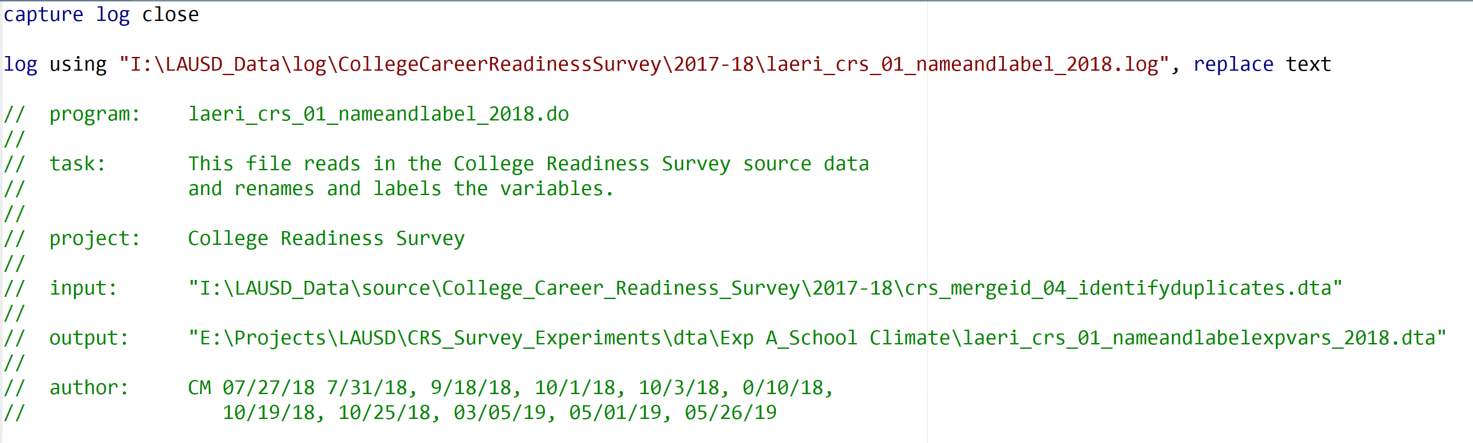
File Header
All LAERI syntax files include a header than explains the purpose of the program.

Program: List the name of the .do file.
Task: Describe the purpose of the .do file and the main tasks. Depending on the complexity of the .do file, the task section of the header might include an outline of tasks and subtasks.
Project: List the project name.
Input: Include the file paths for any data you use in your .do file.
Output: Include the file paths for any files created by your .do file (dta, tables, figures).
Author: List your initials and the dates on which you worked on the .do file.
What do I include after the header? What is a program setup section?
All LAERI syntax files include a “program setup” section below the file header.

Click on the command names on the right to read the Stata manual entries for the commands.
clear all: Drops all data, value labels, matrices, scalars, and stored results from memory
macro drop _all: Drops all macros from memory
set type double: Tells Stata to store numeric variables in double format (~16 digits of accuracy)
set maxvar 10000: Tells Stata to allow up to 10,000 variables
set more off: Tells Stata not to pause or display a -more- message
set linesize 120: Sets the line width, in characters, for both the screen and the log file
version 16: Tells Stata which version of the program you were using when you wrote the syntax file (maintains backward compatibility)
How do I organize syntax files?
Syntax files should be:
- self-contained and able to run as stand-alone programs
- logically organized so that the reader can easily follow the author’s thought process
- formatted in a way that makes them easy to understand (consistent spacing and indentation)
How do I comment on syntax files?